Cal.com vs Calendly for booking sales meetings
Cal.com gives more away free and costs less per seat. Calendly has the better-known booking page but a thin free plan.
 $16/seat/mo
 $12/seat/mo
- Cal.com's free plan covers 1 user with unlimited event types and calendars, Stripe and PayPal payments, and HubSpot and Salesforce sync. Teams costs $16 per seat a month, or $12 billed yearly.
- Calendly's free plan allows one event type and one calendar. Standard is $12 per seat a month ($10 yearly), and Teams, which adds round robin, routing and Salesforce, is $20 ($16 yearly).
- Choose Cal.com for a free solo setup with integrations, lower team prices or SSO and HIPAA on its Organizations plan. Choose Calendly for its AI notetaker, the wider set of built-in workflows and the tool your buyers already know.
- Verdict: for a 5-person sales team that needs round robin, Cal.com costs $80 a month against Calendly's $100. Revbound books meetings from cold email replies through Cal.com or Google Calendar, not Calendly.
Cal.com vs Calendly side by side
| Cal.com | Calendly | |
|---|---|---|
| Price and trial | ||
| Free plan | Yes, 1 user | Yes, 1 event type |
| Team plan | $16 per seat | $20 per seat |
| Yearly team price | $12 per seat | $16 per seat |
| Entry paid plan | Teams, $16 per seat a month | Standard, $12 per seat a month, no round robin |
| Free trial | 14 days on Teams and Organizations | 14 days, then back to Free |
| Scheduling | ||
| Event types on free plan | Unlimited | One |
| Calendars connected | Unlimited, including on Free | 1 on Free, up to 6 on paid plans |
| Round robin | Teams | Teams |
| Routing forms | Teams on the pricing page, attribute routing on Organizations | Teams, routing by Salesforce owner on Enterprise |
| Remove branding | Teams | Standard |
| Integrations | ||
| Payments | Stripe and PayPal on Free | Stripe and PayPal from Standard |
| HubSpot | Two-way sync on Free | Standard and up |
| Salesforce | Two-way sync on Free | Teams and up |
| Webhooks | Yes, on Free | Yes, on Free |
| Security and hosting | ||
| SSO | SAML SSO and SCIM on Organizations | Paid add-on on Teams, included on Enterprise |
| HIPAA | Organizations and up, BAA on Enterprise | Not listed |
| Self-hosting | Cal.diy community edition, MIT licence, no team features | No |
| Booking from cold email replies | ||
| Works with Revbound | Yes | No |
Monthly-billing list prices per seat from the Cal.com and Calendly pricing pages, unless the row says yearly.
Cal.com vs Calendly pricing per seat
Both tools price per seat, and both discount yearly billing. Cal.com has three self-serve tiers: Free, Teams ($16 a seat a month or $12 yearly) and Organizations ($37 or $28 yearly). Enterprise is a custom annual contract.
Calendly has more rungs. Standard is $12 a seat ($10 yearly) and Teams is $20 ($16 yearly). Standard Plus ($24) and Teams Plus ($32) add Notetaker, which records and summarizes calls, and Callie, an AI assistant that schedules over email and is still labelled beta. Enterprise starts at $15,000 a year with a 50-seat minimum.
| Seats | Cal.com Teams | Calendly Standard | Calendly Teams |
|---|---|---|---|
| 1, monthly | $16 / month | $12 / month | $20 / month |
| 5, monthly | $80 / month | $60 / month | $100 / month |
| 5, yearly | $60 / month | $50 / month | $80 / month |
| 10, monthly | $160 / month | $120 / month | $200 / month |
| 10, yearly | $120 / month | $100 / month | $160 / month |
Seats multiplied by the list price per seat. Calendly Standard has no round robin or routing, so a team that shares leads compares Cal.com Teams with Calendly Teams.
A solo founder pays nothing on Cal.com for what Calendly charges $12 a month for: more than one event type, more than one calendar, payments and a CRM sync. Once a team needs round robin, Cal.com stays $4 a seat cheaper on both monthly and yearly billing.
Routing and team scheduling
For a sales team, three features matter: round robin to spread meetings across reps, collective events that need several people free at once, and routing forms that send a lead to the right rep based on their answers.
Cal.com
Round robin, collective events, managed event types and routing forms are listed on Teams. Routing by custom attributes, such as territory or account owner, is on Organizations. Cal.com's own routing page puts routing as a whole on Organizations, so confirm the plan with Cal.com if routing is the reason you are buying. Notifications go by email, SMS and WhatsApp, and text messages use credits.
Calendly
Group and collective meeting types start on Standard. Round robin, routing forms and admin-managed events need Teams, and routing leads to their Salesforce owner is Enterprise only. Reminders and workflows that send emails and texts start on Standard. Paid plans connect up to six Google, Outlook, Microsoft 365 or iCloud calendars per user.
Is Cal.com open source? Cal.diy and self-hosting
This is the biggest recent change, and most comparisons still miss it. Cal.com's public code now lives in a repository called Cal.diy, under the MIT licence. Cal.com describes it as the open source community edition, recommended for personal, non-production use, with the enterprise code removed. That means no Teams, Organizations, Insights, Workflows or SSO in the self-hosted build, and no managed version of it.
So you can still run Cal.com on your own server for a personal booking page. A sales team that wants round robin and routing on its own infrastructure has to ask Cal.com sales about on-premise enterprise access. Calendly has no open source or self-hosted option at all.
On compliance, Cal.com lists SAML SSO, SCIM, SOC 2 and ISO 27001 on Organizations, with HIPAA from that plan up and a signed BAA on Enterprise. Calendly lists SOC 2 Type 2, SOC 3, ISO 27001 and PCI, sells SSO as a Teams add-on and keeps SCIM for Enterprise.
Booking from cold email replies
Most comparisons stop at the booking page. For outbound teams the meeting usually starts somewhere else: a prospect replies "sure, send me some times" to a cold email. Paste a booking link and the lead has to click, pick and fill in a form. Offering two or three real times in the reply is one less step for the lead.
Where Revbound fits
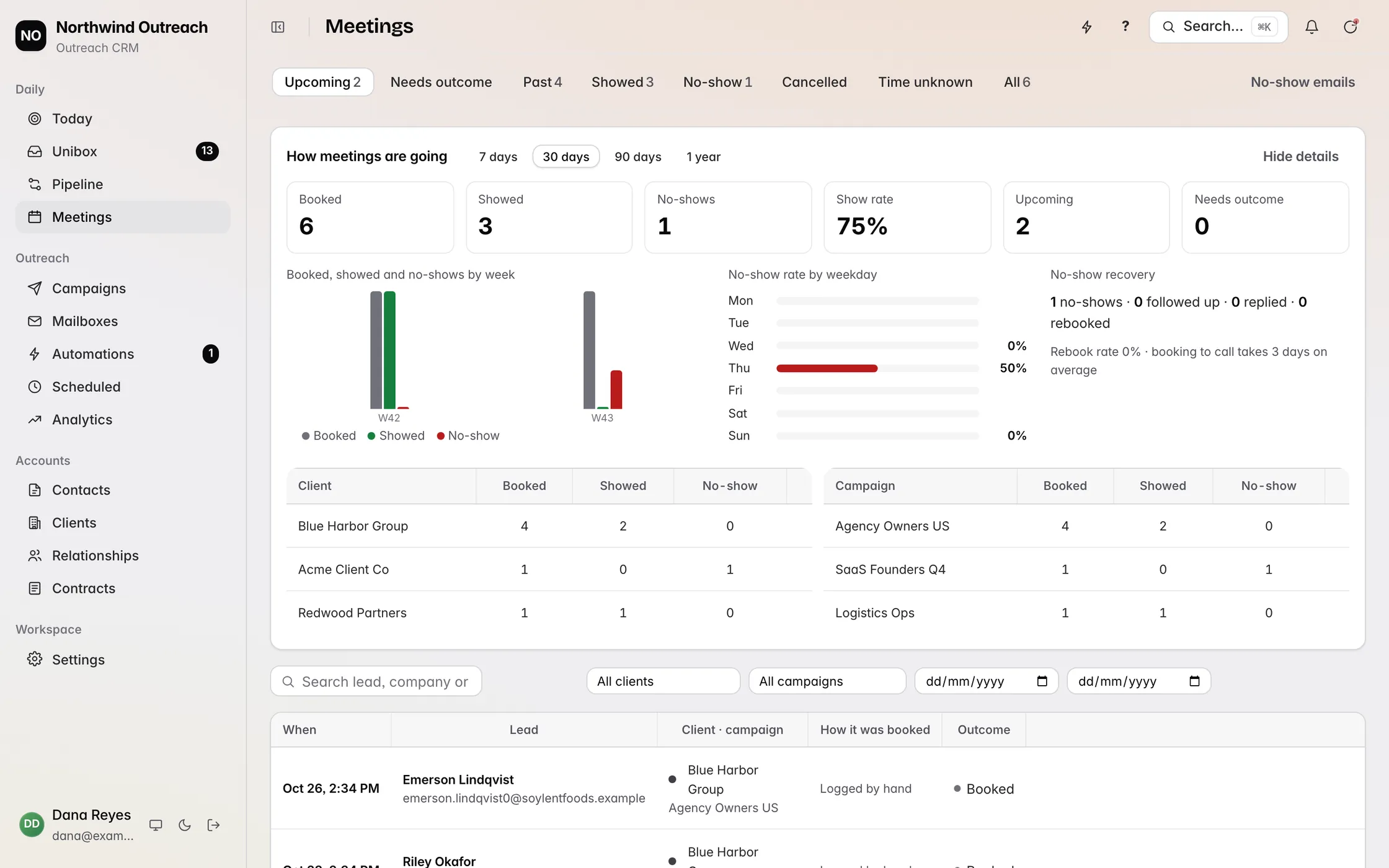
Revbound reads cold email replies from Instantly, Smartlead, Email Bison, PlusVibe, SendKit and ArcSend in one inbox and sorts them with AI. For interested leads it drafts or sends an answer that offers times actually free on your Cal.com or Google Calendar, and books the meeting when the lead says yes.
Revbound does not connect to Calendly. If your team books through Calendly, connect Google Calendar or Cal.com to Revbound instead.
Follow-ups that keep going
Out-of-office leads get a follow-up when they return, referrals get contacted, and long follow-ups run for about two months. No-shows get a rebook. The timing logic is the same as in our guide to following up on cold email.
What it costs and what it skips
Plans are Solo $49, Agency $99 and Connector $149 a month, month to month with AI included, and a 3-day free trial opens every feature. See Revbound pricing.
Revbound is not a scheduling tool and does not replace Cal.com or Calendly for inbound bookings. It does not handle LinkedIn or sync to a CRM, and it is newer and smaller than both.
Choose Cal.com or Calendly
Choose Cal.com if
- You want a free plan with unlimited event types, payments and CRM sync
- Your team needs round robin and you want to pay $4 less per seat
- You need SSO, SCIM or HIPAA without an enterprise contract
- You book meetings from cold email replies with Revbound
Choose Calendly if
- You want call recordings and AI recaps from Notetaker
- Reminders and workflows on a $12 plan are enough
- Your routing depends on Salesforce account owners at enterprise scale
- Your buyers already know the Calendly booking page
Booking is the last step of an outbound sequence. If you are still planning the emails that lead up to it, see our cold email sequence guide.
Cal.com vs Calendly questions
Is Cal.com better than Calendly?
For price and free features, usually yes. Cal.com's free plan includes unlimited event types, payments and HubSpot and Salesforce sync, and its Teams plan is $16 a seat a month against $20 for Calendly Teams. Calendly is the better pick if you want its AI notetaker or your buyers already expect a Calendly link.
Is Cal.com free?
Yes. Cal.com has a free plan for 1 user with unlimited event types and connected calendars, Stripe and PayPal payments, two-way HubSpot and Salesforce sync, and webhooks. Team features such as round robin start on the Teams plan at $16 per seat a month, or $12 billed yearly.
Does Calendly have a free plan?
Yes. Calendly's free plan includes one event type, one connected calendar and one-on-one meetings with a booking page. Standard, at $12 per seat a month or $10 billed yearly, adds more event types, more calendars, payments and branding removal.
Can Cal.com do round robin?
Yes. Cal.com includes round robin, collective events and managed event types on its Teams plan at $16 per seat a month. Calendly also puts round robin on its Teams plan, at $20 per seat a month.
Is Cal.com open source?
Cal.com's public code is now Cal.diy, an MIT-licensed community edition that Cal.com recommends for personal, non-production use. It has the enterprise features removed, including teams, organizations, workflows and SSO. Self-hosting with team features needs an enterprise agreement with Cal.com.
Which is cheaper for a sales team, Cal.com or Calendly?
Cal.com. A 5-seat team on Cal.com Teams pays $80 a month on monthly billing, or $60 billed yearly. The same team on Calendly Teams pays $100 a month, or $80 billed yearly.
Does Revbound work with Cal.com or Calendly?
Revbound works with Cal.com and Google Calendar, not Calendly. It reads cold email replies, answers interested leads with times that are free on your calendar, and books the meeting when they say yes. Plans start at $49 a month with a 3-day free trial.
Cal.com and Calendly are trademarks of their owners, and Revbound is not affiliated with either. Plans and prices can change, so confirm them on the Cal.com pricing page and the Calendly pricing page before you buy.
Booking calls from email replies?
Revbound offers free times from Cal.com or Google Calendar in the reply and books the meeting when the lead says yes.